EPFO UMANG App Process Update: UAN Activation and New UAN Services Shift to UMANG App After Portal Upgrade
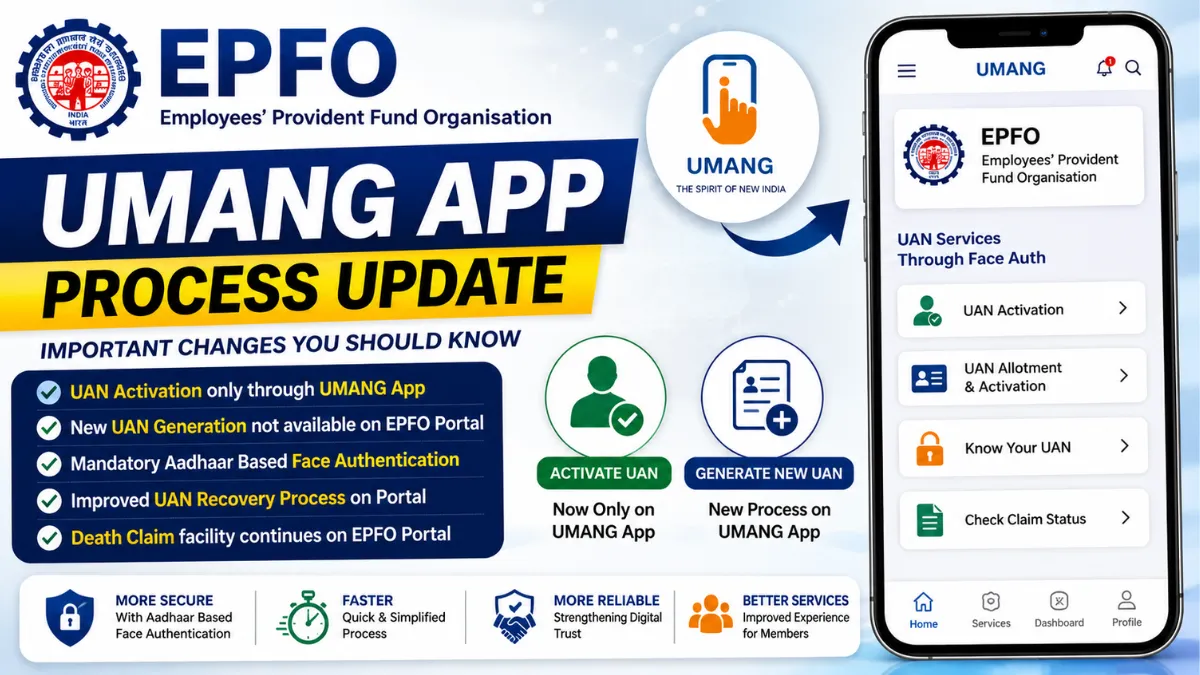
EPFO UMANG App Process Update: The Employees’ Provident Fund Organisation (EPFO) has rolled out significant changes to its digital services following a scheduled upgrade of its Unified Member Portal. One of the biggest updates is that members can no longer activate their Universal Account Number (UAN) or generate a new UAN directly through the EPFO website. Instead, these services have been moved to the government’s UMANG mobile application, with Aadhaar-based Face Authentication becoming a key part of the process.
The changes are aimed at improving security, simplifying identity verification, and modernising EPFO’s online infrastructure. However, members may notice temporary delays while the upgraded system stabilises.
EPFO Completes Major Upgrade of Its Unified Member Portal
After nearly a week of scheduled maintenance, EPFO has restored access to its Unified Member Portal with a redesigned interface and upgraded backend systems. According to the organisation, the software and database improvements are intended to make member services more secure, reliable, and efficient over the long term.
While most existing services remain available, several important member-related functions have now been restructured, requiring users to adopt new procedures.
UAN Activation No Longer Available on EPFO Website
One of the most notable changes is the discontinuation of UAN activation through the EPFO portal.
Employees who receive a new Universal Account Number from their employer can no longer activate it by visiting the EPFO website. Instead, activation must now be completed exclusively through the UMANG (Unified Mobile Application for New-age Governance) app.
The organisation has also removed the option to directly generate a new UAN from the web portal, shifting that service to the mobile application as well.
Why EPFO Shifted These Services to the UMANG App
The move is part of EPFO’s broader effort to strengthen digital security and reduce the risk of identity fraud.
The updated process now requires Aadhaar-based Face Authentication, which adds an additional layer of identity verification before sensitive account-related services can be accessed.
By integrating facial authentication with Aadhaar verification, EPFO aims to ensure that only authorised individuals can activate or obtain a UAN.
Key Changes Introduced After the Portal Upgrade
Members should be aware of the following changes introduced under the latest EPFO UMANG App Process Update:
- UAN activation is no longer available through the EPFO website.
- Direct generation of a new UAN has been removed from the web portal.
- Both UAN activation and UAN allotment are now available only through the UMANG app.
- Aadhaar-based Face Authentication is mandatory for these services.
- The process for recovering a forgotten UAN has been simplified on the upgraded portal.
How to Activate Your UAN Through the UMANG App
Employees who have recently joined an organisation or have not yet activated their UAN must now use the UMANG application.
Follow these steps:
Step 1: Install the UMANG App
Download the UMANG app from the Google Play Store for Android devices or the Apple App Store for iPhones.
Step 2: Open EPFO Services
Launch the application and navigate to the EPFO Services section.
Step 3: Select UAN Activation
Under the “UAN Services Through Face Auth” menu, tap on “UAN Activation.”
Step 4: Complete Face Authentication
Follow the on-screen instructions to complete Aadhaar-based Face Authentication. Once your identity is successfully verified, your UAN will be activated.
New UAN Generation Process Has Also Changed
The process for obtaining a new Universal Account Number has also been updated.
Employees who need a fresh UAN must now use the UMANG application instead of the EPFO portal.
UMANG is the Government of India’s unified digital services platform that provides access to a wide range of public services, including those offered by EPFO.
Steps to Generate a New UAN
To generate a new UAN:
- Open the UMANG app.
- Go to the EPFO Services section.
- Select “UAN Allotment and Activation.”
- Complete Aadhaar-based Face Authentication.
- Enter the required personal and employment details.
- Follow the on-screen instructions to generate your new UAN.
What If You Already Have a PF Account but No UAN?
Some employees may already have an EPF account but may not have been allotted a Universal Account Number.
In such cases, the updated process allows them to obtain a UAN by verifying their registered mobile number and providing the necessary member details.
After successful verification, EPFO will generate a new UAN and automatically link it with the employee’s existing Provident Fund account.
Forgot Your UAN? Recovery Process Is Now Simpler
EPFO has also streamlined the process of retrieving a forgotten Universal Account Number.
Members who cannot remember their UAN can recover it through the upgraded portal by following these steps:
- Enter the registered mobile number.
- Upload the required identity or address proof, if requested.
- Verify the One-Time Password (OTP) sent to the registered mobile number.
- After successful verification, the UAN will be displayed.
The simplified recovery process is intended to reduce delays for members who need immediate access to their EPF services.
Death Claim Facility Continues on the EPFO Portal
Although UAN-related services have been shifted to the UMANG app, EPFO has confirmed that the online facility for filing death claims will continue to remain available through the Unified Member Portal.
Nominees or legal beneficiaries filing a death claim should keep the following documents ready:
- Aadhaar-linked mobile number
- Bank account details
- Cancelled cheque or bank passbook
- Death certificate of the EPF member
- Age proof, where applicable
EPFO has also issued document upload guidelines.
All supporting documents must:
- Be uploaded in PDF format.
- Be smaller than 2 MB each.
- Have filenames without spaces.
Following these requirements can help avoid delays during claim processing.
Also read: Una Murder: Woman Killed After Domestic Dispute Allegedly Turns Violent; Husband Arrested
Members May Experience Temporary Delays
EPFO has advised members that some online services and claim settlements may take slightly longer than usual during the initial stabilisation period following the upgrade.
The organisation explained that additional verification and validation checks are currently being carried out to ensure the integrity of member records after the database migration.
To avoid unnecessary processing delays, members are advised to:
- Avoid repeatedly logging into the portal during peak traffic hours.
- Refrain from submitting the same request multiple times.
- Wait for confirmation before attempting another submission.
What These Changes Mean for EPF Members
The latest EPFO UMANG App Process Update represents a significant shift in how members access key account services. While moving UAN activation and allotment to the UMANG app introduces an extra verification step through Aadhaar-based Face Authentication, it is intended to strengthen account security and reduce the possibility of fraudulent activity.
Although users may experience minor delays while the upgraded platform stabilises, the long-term objective is to provide a more secure, streamlined, and reliable digital experience for millions of EPF subscribers across India. Members planning to activate a UAN, obtain a new UAN, or recover an existing one should familiarise themselves with the updated procedures and use the UMANG app for the services that have now been migrated.